




Wire Transfer Instructions
UHCL Offers Multiple Wire Transfer Options Available To Students To Pay Tuition
UHCL has partnered with Convera to offer you a simple, secure, and smart way to pay your fees online. Convera's platform is trusted by 800+ institutions worldwide to enable payments in 140+ currencies across 200+ countries and territories. This partnership will allow domestic and international students to make tuition and fee payments via wire transfer. This program offers a simple electronic payment mechanism that is secure, fast, and reliable in the student's local currency.
UHCL has partnered with PayMyTuition for international tuition payments. With PayMyTuition, you can pay your tuition payments from any bank, in any country, in any currency at better than bank exchange rates. PayMyTuition is fast, simple, and cost-effective.
Students also still still have the choice to use their own banking institution to wire transfer directly to UHCL's bank.
Please review the details below to find the method best for you.
Convera Wire Transfer
Convera
Students can initiate a wire transfer to the university through Convera by logging into UHCL student self-service and following the instructions below:
- Student Financials
- Convera Tab
- Enter payment amount not to exceed amount owed. Note: If the amount owed is more than $10,000.00 you will need to request more than one transfer. Also, Convera services are unavailable if no balance is owed.
- Accept terms and conditions and select "next"
- You will then be re-directed to Convera website
- Select "Get Quote"
- Complete required information and print confirmation
- Present confirmation and wire instructions to your foreign bank
Quote must be presented to and approved by your bank. Transaction is complete when funding is received by the university from Convera. If you have questions, please call 281-283-2170, option 2.
Why choose Convera?
- Convenience
- You make payment in the currency of your choice. This amount is then converted to U.S. dollars.
- Compare payment options instantly and Convera holds the exchange rate for 72 hours.
- Savings
- The exchange rate is very competitive when compared to your financial institution's retail rates, and bank service fees may be reduced since the wire transfer that you initiate is a local transfer.
- There are no transaction charges from Convera or UHCL, though you may be charged a transaction fee by your bank.
Bank Wire Transfer
You have the option to pay your tuition and fees via electronic wire transfers from your bank to UHCL's bank. We have collected the most important information about this process for your convenience.
- UHCL students must use a UHCL email account to obtain wiring instructions from SBS@uhcl.edu.
- Any cost associated with wire transfer transactions (such as transfer fees, foreign currency conversion cost, etc.) may be charged to the individual or the company initiating a request to transfer funds and shall be deducted from the wire transferred amount.
- Students must pay their tuition and fees in U.S. Dollars.
- UHCL will accept only a wire transfer amount for the actual outstanding tuition and fees as shown on the Student Financial System.
- UHCL will credit student’s account within three business days from the date of receipt, provided all pertinent information is accurate.
- UHCL will return original wire transfer amount if funds transferred were in excess of the outstanding student balance.
- Wire transfer amount received without a UHCL Student Name and UHCL Student ID will be returned within five (5) business days.
PayMyTuition Wire Transfer
International Payments
If you are an international student, you can pay your tuition and fees from any bank, in any country, in any currency at a better rate than bank exchange rates.
International payment options include:
| Payment method | Estimated time for payment confirmation |
|---|---|
| Bank transfers | 2-10 business days ** |
| Debit and Credit cards in your home currency | 2-3 business days |
| eWallet payments | 2-3 business days |
| Plus, other local options (if available) | 2-3 business days |
How to make an international payment
Log into your E-Services account. Upon signing in, select the 'Finance' tile
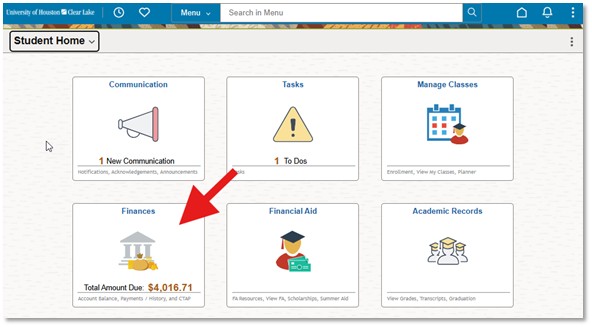
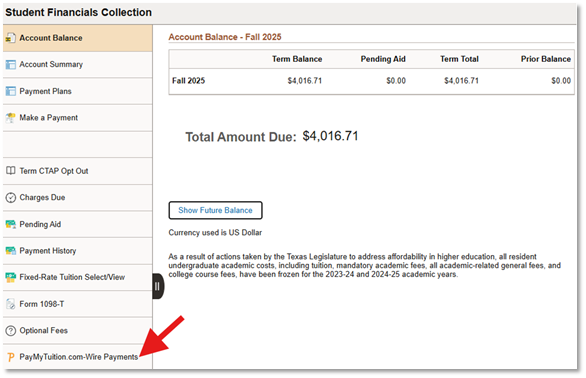
From the navigation panel, select 'PayMyTuition.com-Wire Payments'
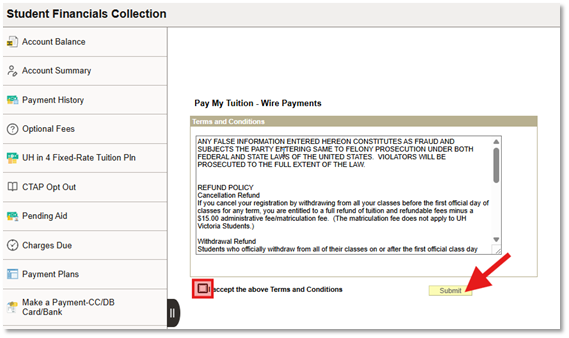
Next, accept the Terms and Conditions and click 'Submit' to be redirected to the PAYMYTuition portal
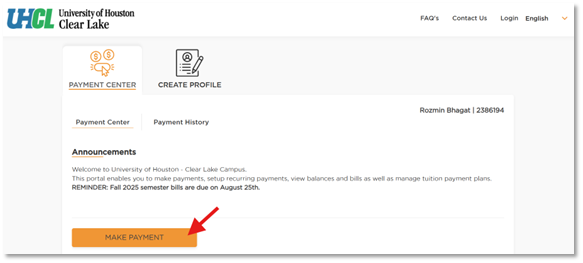
Once you are redirected into the PayMyTuition portal, select the 'Make Payment' button in the Payment Center to initiate your transaction
Follow the steps on the screen to create and fund your payment to the University of Houston-Clear Lake.
PayMyTuition Rate Guarantee
- Send your bank or competitor's quote to support@paymytuition.com. Make sure to include your Payment ID within the email so we can credit your transfer.
- Once we get your claim, we'll review it and one of our support team members will contact you to confirm your request.
- If your request is approved, we'll send you a $25 Amazon Gift Card for your troubles.
- Our guarantee is valid for Bank Transfers only. The guarantee is not applicable for Credit Card or eWallet Checkouts.
- Only applicable to Foreign Currency transactions over $2,500.00.
- Limit of One Request per payer.
Need Assistance? Connect with PayMyTuition.
- U.S. & Canada toll free: 1-855-663-6839
- Email: support@paymytuition.com
- Web: www.paymytuition.com
- Frequently Asked Questions
-
For questions regarding: How to add an "authorized user" or "on-demand" access to translated guides please email Student Business Services at sbs@uhcl.edu.